Short answer: DepEd teachers, staff and learners get Canva for Education free through the partnership between the Department of Education and Canva Philippines. To log in, go to canva.com, choose Continue with DepEd email, enter your @deped.gov.ph address and sign in with your DepEd Microsoft 365 account. You land in the official DepEd Canva team, with premium templates and tools for class.
What Is the DepEd and Canva Partnership?
DepEd signed a partnership with Canva Philippines on October 30, 2024 to give public school teachers and staff free access to Canva for Education, plus training. DepEd said training would start with a pilot and reach all 17 regions from January 2025, with learners getting access later. Canva's help center now says all DepEd staff and students have free access to Canva Education.
Canva for Education is Canva's free plan for K-12 schools. For DepEd users it includes:
- Premium design features, such as the background remover and premium templates
- Millions of images, fonts, graphics, videos and animations
- Education templates for classroom activities
- Simple tools to manage student work
- Integrations with Google Classroom and Microsoft Teams
For a full comparison with the paid plan, see Canva for Education vs Canva Pro.
Who Can Use Canva With a DepEd Account?
Canva says all teachers, staff and learners with an official DepEd Philippines email address can access Canva Education. That covers:
- Teachers and school or division staff with an @deped.gov.ph email.
- Learners with an official DepEd learner email. Canva gives [email protected] as an example of the format.
If you are not covered by the DepEd partnership:
- Private school teachers in the Philippines can apply through Canva's normal teacher verification, as long as they meet Canva's eligibility guidelines. Our Canva for Education setup guide explains the steps.
- College and university students and staff are not eligible for Canva for Education. Canva points them to Canva for Campus instead.
How to Log In to Canva With Your DepEd Email
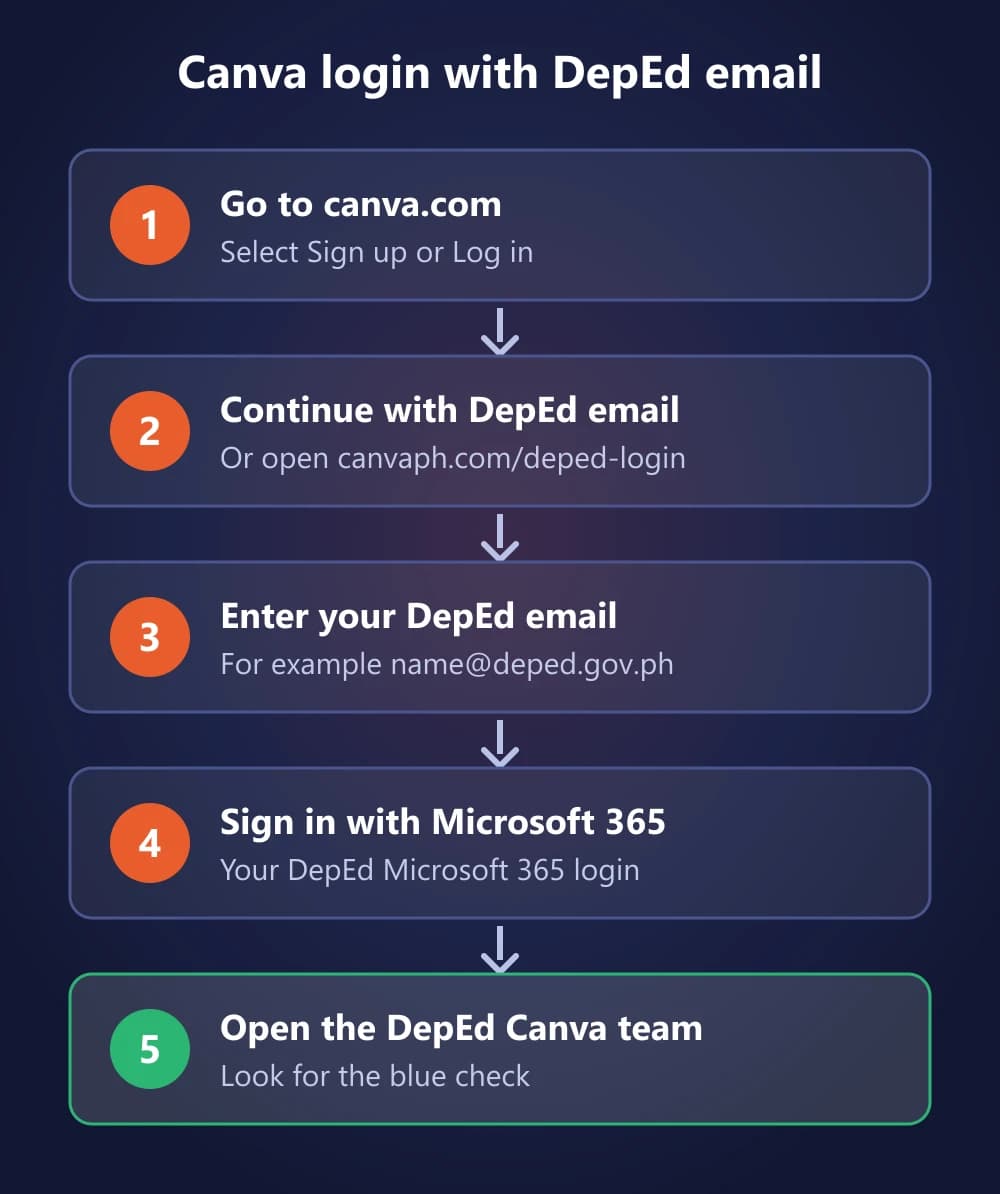
Log In With DepEd SSO
- Go to www.canva.com and select Sign up or Log in.
- Select Continue with DepEd email (or Continue with email).
- Enter your @deped.gov.ph email address.
- Enter your Microsoft 365 email and password for your DepEd account.
- You are redirected to your DepEd Canva team. Look for the team with the blue check.
You can skip the first steps with Canva's direct DepEd link: canvaph.com/deped-login. This sign-in method is called single sign-on (SSO): you use your DepEd account instead of a separate Canva password.
What Happens to Your Existing Canva Account?
Signing in with DepEd SSO does not delete anything you already have:
- Old account on your DepEd email: Canva says your account and personal designs stay intact. You are added to the official DepEd Canva team, and you can switch teams to reach your personal one.
- Account on a personal email (Gmail, Yahoo and others): it stays separate, and you keep logging in to it with your personal details.
DepEd also set rules for personal teams. Its memorandum on Canva for Education (DM No. 055, s. 2025) asked personnel to move files from personal teams on @deped.gov.ph addresses into the official DepEd team before June 1, 2025, and says those personal teams will be archived. If you still keep work in an old personal team on your DepEd email, check with your Division ITO.
Can Teachers Add Learners to the DepEd Team?
Not at the moment. Canva explains that learners use a different DepEd email domain, so teachers cannot add them to the DepEd Canva team. Teachers can still work with learners by sharing designs with them, and Canva says to watch for announcements from DepEd and Canva about learner access.
Two related points from Canva's DepEd help page:
- Your designs are private by default. Other people in the DepEd team cannot see them unless you change the share settings.
- You can present offline. For presentation designs, select Enable offline presenting before you lose your internet connection, which helps in classrooms with weak signal.
Troubleshooting Canva DepEd Login Problems
Canva for DepEd access is free. You never need to buy a "DepEd Canva account" or an activation link from anyone.
- Logged in but no DepEd team: select your account profile on the homepage and look under Teams. If the DepEd team is not listed, tell your Division ITO.
- Errors when logging in: confirm with your Division ITO that your DepEd account is activated, double-check your email and password, clear your browser cookies and cache, and try again.
- Logged in with an old regional email: Canva suggests choosing that regional email on the login screen, selecting Forget login or Forget account, then logging in again with Continue with DepEd email and your @deped.gov.ph address.
- Account shows Canva Free: education access belongs to the DepEd team, not your individual account, so switch to the DepEd team from your account menu.
- Forgot your DepEd email or password: learners contact the school ICT coordinator; school or division personnel contact the Division ITO; regional personnel contact the Regional ITO.
If none of this works, Canva has a troubleshooting form linked from its DepEd help page.
Rules for Using Your DepEd Canva Account
DepEd's memorandum says Canva for Education accounts and licenses are for educational purposes and the performance of official duties, and that the Department retains authority over the accounts and the materials made with them. In practice:
- Use the DepEd team for lessons, school materials and official work.
- Keep personal or business projects in a separate personal Canva account.
- Remember that access is tied to your DepEd email, so it depends on your role at DepEd.
What Happens When Learners Graduate?
Canva for Education access comes through DepEd, so it is not meant to follow learners after they leave school. Before graduating, copy any designs you want to keep to a personal Canva account. Our setup guide has the steps to copy designs before you leave school.
In 2026, DepEd and Canva also ran the DepEd x Canva Graduate Access Program. According to its official FAQ:
- It covered confirmed SY 2025-2026 Grade 12 graduates from DepEd public schools with a DepEd email and an active Canva Education account in the DepEd team.
- Eligible graduates got one year of Canva Pro on a personal Canva account, free.
- It had to be claimed between April 1 and July 1, 2026, with no extensions, so that window has closed.
- After the year, the account returns to Canva Free and keeps its designs.
Private school students and graduates from earlier school years were not covered. Watch DepEd and Canva announcements for any future round.
Final Thoughts
For DepEd teachers, staff and learners, Canva for Education costs nothing and takes one sign-in: Continue with DepEd email at canva.com, or canvaph.com/deped-login. Most problems come from using the wrong account or team, and your Division ITO or school ICT coordinator can fix account issues. Use the DepEd team for school work, and keep personal projects in your own account.
Sources Checked
- Log in to Canva with your DepEd (Philippines) Email — Canva Help Center
- Canva Gives Teachers Premium Access and Training for Free — DepEd
- DM No. 055, s. 2025: Availability and Use of Canva for Education in the Department of Education — DepEd
- DepEd x Canva Graduate Access Program FAQ — Canva Philippines
- Teachers, students get premium Canva accounts — Inquirer
- Canva Education eligibility guidelines — Canva