Short answer: Diffit and Canva for Education do different jobs. Diffit for Teachers is an AI tool that creates and adapts lesson content to any reading level or need, with supports for English learners, special education and intervention. Canva for Education is a free design and classroom platform for making, assigning and presenting lessons and student projects. Choose Diffit for differentiation, Canva for design and delivery, or use both.
What Is Diffit for Teachers?
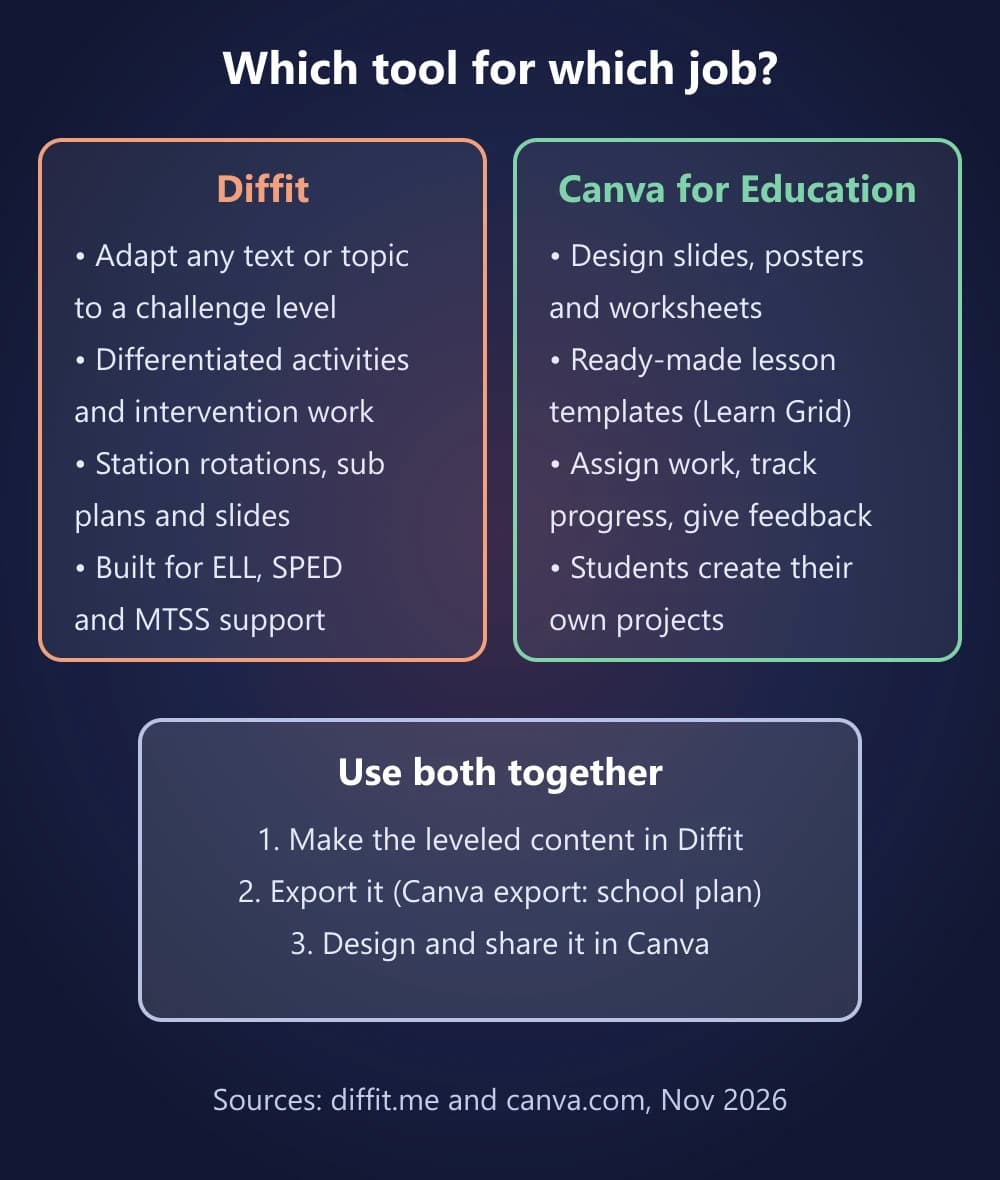
Diffit is an AI tool built for teachers to create "quality, print-ready resources for any instructional need." You start from a topic, a text, a PDF, a web page (URL) or a video transcript, and Diffit turns it into student-ready resources at the reading level you need. You can also set the MTSS tier, challenge level, language, scaffolds and standards, and use Diffit Chat to refine or translate the result.
Diffit can produce differentiated activities, station rotations, sub plans, intervention materials and slides. You then edit the result, print it, or export it to Google Docs, Slides, Forms, Classroom or Microsoft 365. Diffit says it is designed for ELL, SPED, intervention and MTSS contexts. Students never log in to Diffit; it is a teacher-only tool.
What Is Canva for Education?
Canva for Education is Canva's free plan for K-12 teachers, students and schools. Canva says it includes most of its premium design features plus classroom tools. Teachers use it to design slides, worksheets and posters, and students use it to create their own projects.
For the 2026-27 school year, Canva highlights:
- Learn Grid: more than 50,000 curriculum-mapped resources plus AI activity generation, with learning games that track student answers.
- Canva AI: generates images, writes and refines text and builds designs.
- Assign: gives each student their own copy, shows progress in real time and connects results to tools such as Google Classroom.
- Offline mode and Live Learning Sessions for whole-class activities.
Our Canva for Education setup guide explains how teachers get verified and invite students.
Diffit vs Canva for Education: Side by Side
Feature Comparison Table
| Category | Diffit | Canva for Education |
|---|---|---|
| Main job | Create and adapt lesson content for different levels and needs | Design, assign and present lessons and student projects |
| Price | Free Basic; Premium $14.99/month or $149.99/year (US); school licenses | Free for eligible K-12 teachers, students and schools |
| Who uses it | Teachers only; no student logins | Teachers and students, who join through a teacher invite |
| AI focus | Leveled, scaffolded resources by tier, language and standard | Learn Grid activities, Canva AI for text, images and designs |
| Output | Print-ready PDFs and editable exports to Google and Microsoft | Designs, presentations, worksheets, games and websites |
| Student data | Says it collects zero student data; FERPA and COPPA compliant | FERPA, COPPA and GDPR compliant, with safe-for-school content |
| Best for | Differentiation, ELL, SPED and intervention | Visual lessons, assignments and student creativity |
| Category | Diffit | Canva for Education |
|---|---|---|
| Main job | Create and adapt lesson content for different levels and needs | Design, assign and present lessons and student projects |
| Price | Free Basic; Premium $14.99/month or $149.99/year (US); school licenses | Free for eligible K-12 teachers, students and schools |
| Who uses it | Teachers only; no student logins | Teachers and students, who join through a teacher invite |
| AI focus | Leveled, scaffolded resources by tier, language and standard | Learn Grid activities, Canva AI for text, images and designs |
| Output | Print-ready PDFs and editable exports to Google and Microsoft | Designs, presentations, worksheets, games and websites |
| Student data | Says it collects zero student data; FERPA and COPPA compliant | FERPA, COPPA and GDPR compliant, with safe-for-school content |
| Best for | Differentiation, ELL, SPED and intervention | Visual lessons, assignments and student creativity |
Is Diffit Better Than Canva for Differentiation?
For differentiation, yes. Diffit's whole workflow is built around adapting one piece of content for different learners: you choose the challenge level, MTSS tier, language and scaffolds, and Diffit rewrites the resource to match. That makes it the faster tool when one class needs the same lesson at several levels.
Canva for Education can also generate activities with AI, organized by subject, grade and topic in Learn Grid. But Canva's strength is everything around the content: designing it well, assigning it, tracking progress and letting students create. Diffit does not offer those classroom and design features.
General AI chatbots such as ChatGPT can also rewrite a text at a simpler level. The difference is that Diffit is built for classrooms: the reading level, tier and scaffolds are settings rather than prompts, the output is print-ready and exports straight to Google or Microsoft, and Diffit says it collects no student data.
Is Diffit Free? Diffit vs Canva Pricing
- Diffit Basic (free): create, edit, download as PDF, print and share resources, with access to content made in the last 90 days.
- Free Premium for first-year teachers: Diffit gives teachers in their first year the full, unlimited version through a short form; the current offer runs through June 30, 2027.
- Diffit individual Premium: $14.99 a month or $149.99 a year, for US customers; Diffit says prices may vary by country. It adds exports to Google and Microsoft, alignment to standards and MTSS tiers, full resource history and graphic organizers.
- Diffit for Schools: a flat-rate annual license based on student enrollment, covering all staff. It adds export to Canva, an admin dashboard and support.
- Canva for Education: free for eligible K-12 teachers, their students and qualified schools and districts, AI tools included. College and university staff are not eligible; Canva points them to Canva for Campus.
Check both companies' pricing pages before you buy, because plans change.
Student Privacy and AI
Both tools are built with schools in mind, but they handle students differently:
- Diffit says it has no student logins and no student AI, collects zero student data, and is FERPA and COPPA compliant. It collects only teacher names, email addresses and IP addresses.
- Canva for Education gives students their own accounts through their teacher. Canva says it is FERPA, COPPA and GDPR compliant and filters its libraries to be safe for school. Students only get a few AI tools by default (Magic Media, Dream Lab and Magic Insights), and school admins control the settings.
How much AI do you get in Canva for Education? Canva's help center says Education users can use Standard AI tools as much as they like and get 10 times more AI allowance than Canva Free for Premium and Ultra AI tools, the same level as Canva Pro. Each member has their own allowance, and it resets every month.
If your school limits student accounts or student AI, Diffit's teacher-only model is simpler. If you want students to create and collaborate, Canva is built for that.
How to Use Diffit and Canva Together
Many teachers use both tools in one workflow:
Diffit and Canva Workflow
- In Diffit, enter your topic or add your existing material (text, PDF, link or video transcript), and set the reading level, language or scaffolds each group needs.
- Edit the leveled versions until they are right for your class.
- Export them. With Diffit for Schools you can export to Canva directly; on other plans, export to Google or Microsoft formats or download a PDF.
- In Canva for Education, design the final worksheet, slides or poster, then Assign it so each student gets their own copy.
- Track progress and give feedback in Canva or your LMS.
Which Should You Choose?
- Choose Diffit if your main problem is reaching students at different reading or challenge levels, or creating ELL, SPED and intervention materials fast.
- Choose Canva for Education if you want free, polished lesson designs, assignments and student projects, and you teach at an eligible K-12 school.
- Use both if you differentiate a lot and also want your materials to look good and reach students digitally.
Still choosing a Canva plan? Read Canva for Education vs Canva Pro.
Final Thoughts
Diffit and Canva for Education are not really rivals. Diffit answers "how do I make this content work for every student?", and Canva answers "how do I design it, share it and let students create?". Canva for Education is free for eligible K-12 schools, and Diffit's free Basic plan is enough to try the workflow before paying for Premium.
Sources Checked
- Diffit — homepage
- Diffit — pricing and school licenses
- Diffit — individual teacher subscription
- Diffit — privacy and security
- Diffit — free access for first-year teachers
- Diffit — FAQ
- Understanding your AI usage — Canva Help Center
- Your Back to School toolkit (July 2026) — Canva Newsroom
- Canva Education — Canva
- Change access to Magic and AI features — Canva Help Center