Short answer: QMS Network is a layer 1 blockchain built for the post-quantum era, and its public testnet is live and free. Add QMS Testnet to your wallet (chain ID 19480, RPC https://rpc.testnet.qms.finance), claim free test QMS from the official faucet (10 QMS per request, four requests per 24 hours), then make your first transaction. Test QMS has no value, and QMS has not announced an airdrop or points program.
This guide covers every step from an empty wallet to a first transaction, a daily GM and a first smart contract. It also explains what makes QMS different from other EVM testnets: variable block times, a moving base fee and testnet resets.
We checked every value and limit below against QMS's documentation, website, faucet and RPC on October 23, 2026. QMS calls this testnet a preview (version 0.1), so things change. If something differs, trust the official page.
QMS Testnet in Brief
- What it is: QMS Network is a proof-of-useful-work layer 1 for the post-quantum era, and its testnet (v0.1) is EVM-compatible.
- Network: chain ID 19480, RPC https://rpc.testnet.qms.finance, currency QMS, explorer QMSScan.
- Faucet: 10 test QMS per request, four requests every 24 hours.
- Quirks: block times vary around 10 seconds, the base fee moves, and the testnet can be reset.
- Airdrop: none announced as of October 23, 2026, and test QMS has no value.
What Is QMS Network?
QMS describes itself as a layer 1 blockchain for the post-quantum era. Two things set it apart:
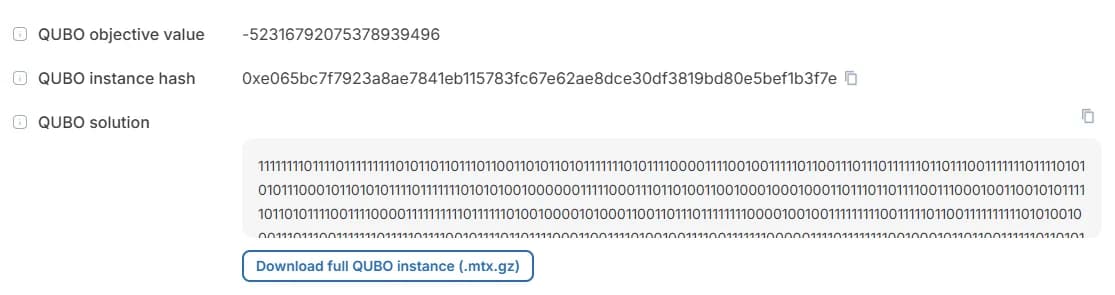
- Proof-of-useful-work (PoUW): instead of computing hashes, miners solve real optimization problems. The first problem class is QUBO (quadratic unconstrained binary optimization). Each block on the explorer shows the problem that was solved to produce it and the winning solution.
- Quantum resistance in layers: QMS says its consensus is quantum-resistant by design because block production depends on computational work, not signatures. A later finality layer will use a post-quantum signature algorithm.
The execution layer is a standard Ethereum execution client (a fork of Reth), so QMS is EVM-compatible. MetaMask, Rabby, Hardhat, Foundry and Remix work without changes.
What's live today: QMS launched its public testnet on September 30, 2026 as QMS v0.1, a preview release. According to the QMS releases page, v0.1 has PoUW consensus, the EVM layer and the explorer. Difficulty adjustment, block rewards and the finality layer come in the next release. For now the QMS team runs the miners. The first app on the testnet is QWAP, an independent DEX where you can test swaps and liquidity pools.
Because "QMS" also means "quality management system", search results are often about something else. The blockchain lives at qms.finance, with docs at docs.qms.finance.
QMS Testnet Network Details
| Category | Value | Notes |
|---|---|---|
| Network name | QMS Testnet | Any name works in your wallet |
| Chain ID | 19480 | 0x4c18 in hex |
| RPC URL | https://rpc.testnet.qms.finance | WebSocket: wss://rpc.testnet.qms.finance |
| Currency symbol | QMS | 18 decimals, no monetary value |
| Block explorer | https://testnet.qmsscan.io | QMSScan, based on Blockscout |
| Faucet | https://faucet.testnet.qms.finance | 10 QMS per request, 4 requests per 24 hours |
| Status page | https://status.testnet.qms.finance | Check here first if the RPC stops responding |
| Block time | About 10 seconds (target) | Varies, sometimes several times longer |
| Category | Value | Notes |
|---|---|---|
| Network name | QMS Testnet | Any name works in your wallet |
| Chain ID | 19480 | 0x4c18 in hex |
| RPC URL | https://rpc.testnet.qms.finance | WebSocket: wss://rpc.testnet.qms.finance |
| Currency symbol | QMS | 18 decimals, no monetary value |
| Block explorer | https://testnet.qmsscan.io | QMSScan, based on Blockscout |
| Faucet | https://faucet.testnet.qms.finance | 10 QMS per request, 4 requests per 24 hours |
| Status page | https://status.testnet.qms.finance | Check here first if the RPC stops responding |
| Block time | About 10 seconds (target) | Varies, sometimes several times longer |
Step 1: Add QMS Testnet to Your Wallet
You need an EVM wallet that lets you add a custom network. QMS's docs name MetaMask, Rabby and OKX Wallet, and Ledger or Trezor through wallet software that supports custom networks. Use a separate wallet for testing if you can.
In MetaMask:
- Open the network menu and choose Add a custom network.
- Enter the values from the table: network name QMS Testnet, RPC URL
https://rpc.testnet.qms.finance, chain ID 19480, currency symbol QMS and block explorerhttps://testnet.qmsscan.io. - Save and switch to QMS Testnet.
If your wallet says it can't fetch the chain ID, check the RPC URL for typos, make sure it starts with https:// and remove anything after the host name. If it still fails, check the status page before assuming the problem is on your side.
QMS Testnet is also listed in the public chain registry (ethereum-lists), so some wallets and sites such as Chainlist can add it with one click. Always compare the chain ID and RPC with the values above before you approve.
Step 2: Get Free Test QMS From the Faucet
- Copy your wallet address with your wallet's copy button. It starts with
0x. - Open the QMS faucet, paste your address and tick Cloudflare's Verify you are human box.
- Select Start Mining. The faucet runs on PoWFaucet, so your browser does a proof-of-work task before the faucet sends 10 QMS. Keep the tab open until the faucet confirms the payout.
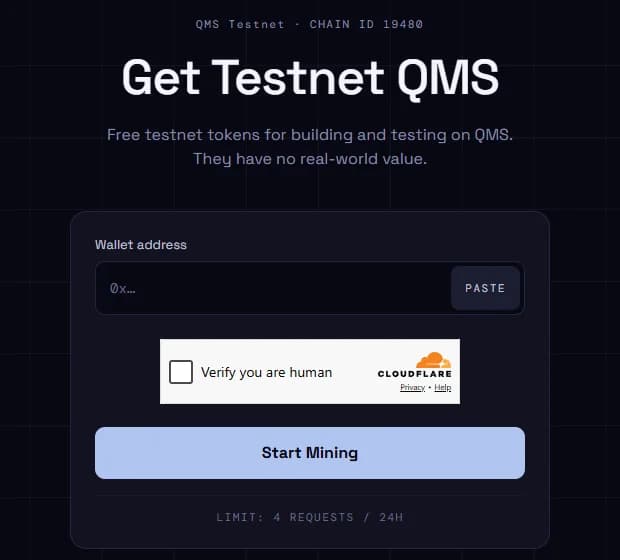
Faucet limits (October 23, 2026): 10 QMS per request and four requests per 24 hours, processed one at a time. That's up to 40 QMS a day, far more than a daily GM and deployment need.
If your balance doesn't change, search your address on QMSScan. If the faucet transfer is there, refresh your wallet by switching networks and back. If it isn't, the request failed, so submit it again. QMS said in its October 5 AMA recap that bots overwhelmed the faucet after launch and that it added anti-bot protection, so expect the captcha and the mining step.
A faucet only needs your public address. QMS says its team will never message you first on X or Discord and will never ask for your seed phrase or private key. If anyone does, it's a scam.
Step 3: Make Your First Transaction
The simplest first transaction is a transfer to yourself or a second address:
- Check that QMS Testnet is the active network.
- Select Send, paste the recipient address (don't type it by hand) and enter an amount. Leave some QMS for the fee.
- Confirm. The transaction usually lands in the next block, about 10 seconds later.
- Copy the transaction hash (a 66-character
0xvalue) and paste it into QMSScan. Success means the transfer is done.
Open the block your transaction landed in and select View details. Unlike most explorers, QMSScan shows the QUBO problem that was solved to produce that block and the winning solution, and you can download the problem file.
You can also try QWAP, the first DEX on QMS: swap test tokens, add liquidity and view your positions under Portfolio. QWAP prices, APRs and volumes are test values only.
Daily Activity on QMS: Send a GM and Deploy a Contract on PingGM
If you want a repeatable daily on-chain habit, PingGM supports QMS Testnet for a daily GM and a no-code contract deployment.
- Go to PingGM and connect your wallet.
- Select the Testnet filter, choose QMS Testnet and select Send GM. Approve the network switch if your wallet asks.
- Confirm in your wallet. You pay the PingGM fee plus gas. On October 23, 2026 the PingGM fee for a GM on QMS Testnet was 0.1 QMS.
- To deploy a contract without writing code, open PingGM's QMS Testnet page and use the deployment card on the right, or go straight to the PingGM deployer for QMS Testnet, then confirm. The PingGM deploy fee was 0.2 QMS.
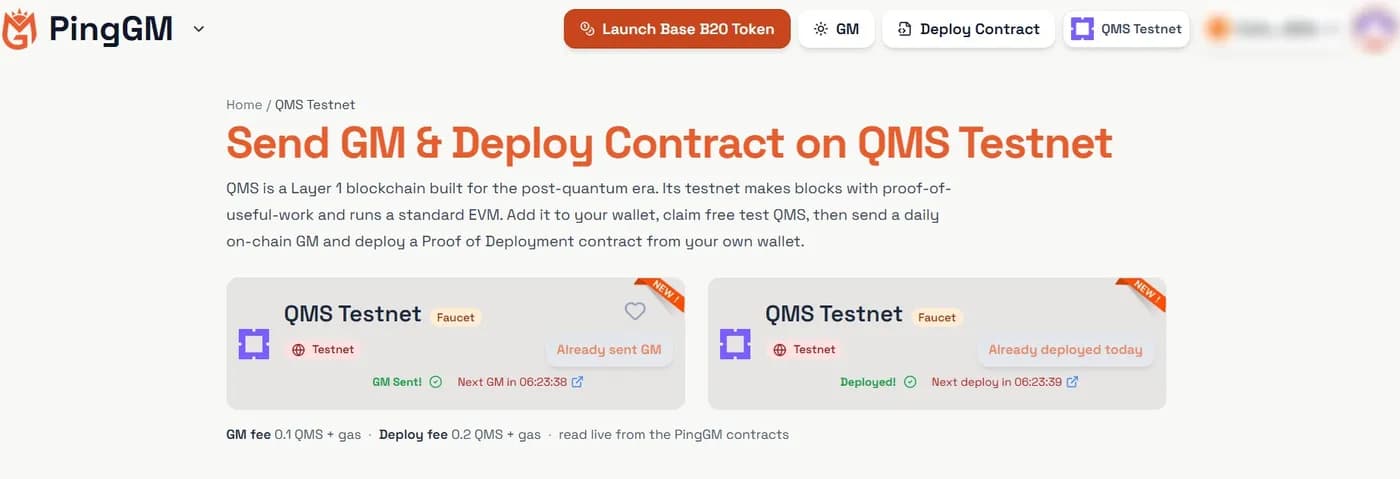
The screenshot shows PingGM's QMS Testnet page after a GM and a deployment: the buttons read Already sent GM and Already deployed today, with a countdown to the next one, and the current fees are shown under the cards.
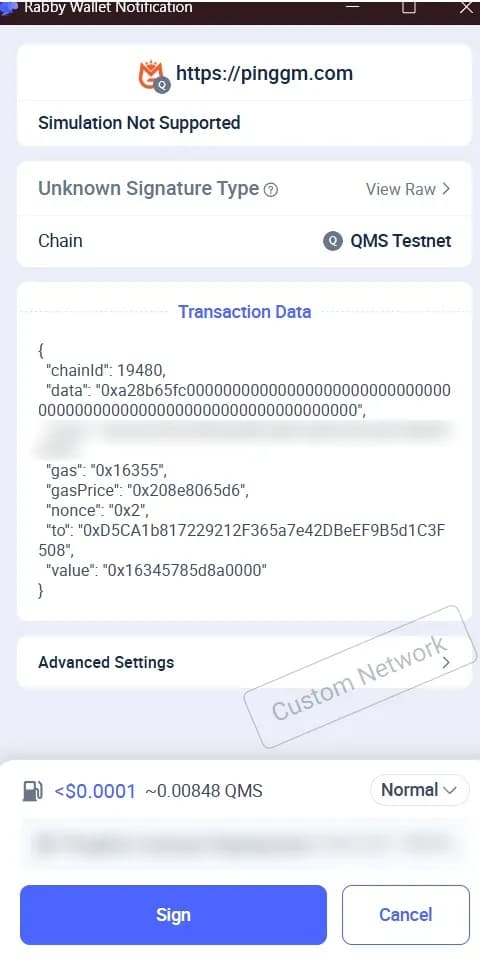
Rabby shows Simulation Not Supported, Unknown Signature Type and a Custom Network stamp because it can't simulate transactions on QMS Testnet. That's normal for a custom testnet. Check that the chain ID is 19480 and that the value is the PingGM fee: 0x16345785d8a0000 is 0.1 QMS. Rabby estimated about 0.0085 QMS of gas on top, so a GM costs about 0.11 QMS and one 10 QMS faucet request covers many days.
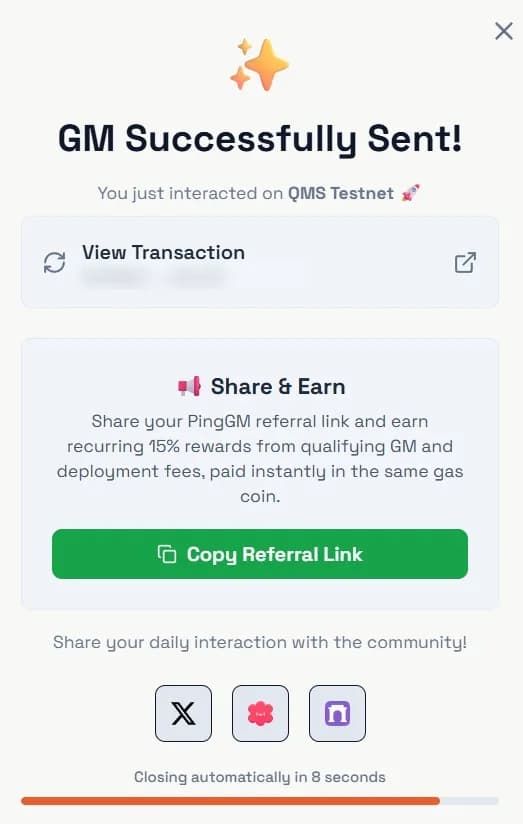
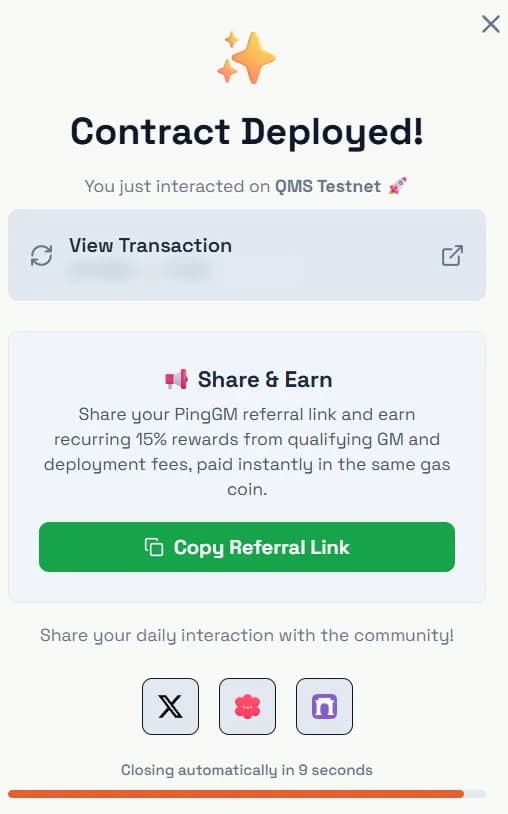
A GM Successfully Sent! dialog confirms it, and View Transaction opens the GM on QMSScan. A deployment ends the same way, with a Contract Deployed! dialog that links to the deployment transaction.
You can send one GM and make one deployment per wallet per UTC day. Both reset at 00:00 UTC. Fees are read live from the PingGM contracts, so check the amount in your wallet before you sign, or see every network's GM and deploy fee. PingGM is non-custodial: you sign every transaction from your own wallet.
Because QMS blocks vary in time, a GM can take 10 seconds or more to confirm. That's normal on this network. For how PingGM's deployer works on other networks too, see our guide to deploying smart contracts across multiple blockchains with PingGM.
Is There a QMS Network Airdrop? Campaigns, Tasks and Points
As of October 23, 2026, QMS has not announced an official points program, task portal, daily check-in or airdrop for testnet users. Its website, docs, release notes and news posts don't mention one. The only official invitations are to use the faucet, try QWAP, build and give feedback in the QMS Discord.
Some airdrop sites describe QMS testnet activity as a way to become an "early adopter". That's their speculation, not a QMS announcement. Keep three things in mind:
- Testnet activity doesn't guarantee rewards. QMS hasn't promised any, and points from any program never guarantee an airdrop.
- Resets are expected. QMS says the testnet state won't carry over to the next version, so balances and history are temporary.
- Mining rewards are a mainnet design, not a testnet reward. QMS says miners will eventually earn block rewards and payments for solving client problems. On v0.1, block rewards are off and the team runs the miners.
If QMS launches a campaign, it will be announced on qms.finance/news, QMS on X or the official Discord. Check there before trusting a link.
For Developers: Deploy and Verify With Foundry or Hardhat
QMS runs the Osaka hard fork from genesis, so every earlier fork, including Prague, is active. Compile for prague (the default in current Solidity and Foundry) or osaka. Contracts compiled for cancun also run.
Foundry:
forge create --rpc-url https://rpc.testnet.qms.finance \
  --private-key $PRIVATE_KEY \
  --broadcast \
  src/Counter.sol:Counter
Hardhat 3: add a network with url: "https://rpc.testnet.qms.finance" and chainId: 19480, keep your key in the Hardhat keystore, then run npx hardhat ignition deploy ignition/modules/Counter.ts --network qmsTestnet.
Verify on QMSScan (no API key needed):
forge verify-contract --verifier blockscout \
  --verifier-url https://testnet.qmsscan.io/api \
  <ADDRESS> src/Counter.sol:Counter
With Hardhat, run npx hardhat verify blockscout --network qmsTestnet <ADDRESS>. Fund the deploying wallet from the faucet first, and never commit a private key.
What's Different From Ethereum
- No blob transactions. Type-3 transactions are rejected with error
-32003.BLOBBASEFEEreturns 1 wei andBLOBHASHreturns zero. - No randomness from
PREVRANDAO. It returns zero on this release, so never use it as a random source. safeandfinalizedreturn genesis. Until the finality layer launches, these block tags return the genesis block. Tooling that waits forfinalizedmay stall.- Supported transaction types: legacy, access-list, EIP-1559 and EIP-7702.
- Public RPC limits: 50 requests per second per client (bursts to 200), up to 20 WebSocket connections, and no
debugortracenamespaces. There are no third-party RPC providers yet. - Signatures: accounts use standard Ethereum (ECDSA) signatures. You can't upgrade an account to post-quantum signatures on this testnet.
Gas Fees on QMS Testnet
Gas is paid in QMS and uses EIP-1559 pricing, so the base fee rises and falls with demand. On October 23, 2026 we saw the base fee move between about 73 and 206 gwei in one day, and at the 206 gwei point the RPC suggested a gas price of about 412 gwei.
QMS's docs warn that some wallets set fees from eth_gasPrice alone and leave too little margin. If the base fee rises above your maximum fee, your transaction waits until it drops again. Developers should set maxFeePerGas and maxPriorityFeePerGas explicitly. In a wallet, use Speed up or raise the maximum fee in the advanced fee settings.
Common QMS Testnet Errors and Fixes
- Transaction pending for a long time: look up the hash on QMSScan. If it's confirmed, reload your wallet. If it's missing, raise the fee with Speed up.
- Stuck transaction and missing history after a reset: your wallet is reusing an old nonce. Clear the account's activity and nonce data (MetaMask extension: Settings, Developer tools; mobile app: Settings, Advanced, Reset account), then resend.
- Faucet refuses the request: you've used your four requests for the last 24 hours, or another request is still processing. Wait and retry.
- "Transaction type not supported": your tool is sending a blob (type-3) transaction. Switch to EIP-1559 or legacy.
- Swap failed with "expired" on QWAP: the transaction waited past its deadline but still cost a fee. Resubmit with a higher maximum fee and a longer deadline.
- Wrong network or chain ID mismatch: check that your wallet uses chain ID 19480 and
https://rpc.testnet.qms.finance. - RPC not responding: check status.testnet.qms.finance. If it persists, ask in the QMS Discord with your address, the transaction hash and your wallet name.
Start Using QMS Testnet
You now have QMS Testnet in your wallet, free test QMS and an idea of how its block times and fees behave. The quickest way to put it to use is to send a daily GM on PingGM, then deploy a contract on QMS Testnet from the same wallet. Each is one wallet confirmation and leaves a real transaction on QMSScan.
The same flow works on other testnets: see our Maroo testnet guide, SimpleChain testnet guide, DogeOS testnet guide and Base Sepolia faucet guide.
Sources Checked
Last reviewed: October 23, 2026.
- QMS Network website and news
- Welcome to QMS Testnet — QMS (September 30, 2026)
- QMS AMA Recap: The Vision, the Testnet, the Road Ahead — QMS (October 5, 2026)
- Onboarding — QMS Docs
- Make your first transaction — QMS Docs
- Troubleshooting Connections — QMS Docs
- How QMS Works at a Glance — QMS Docs
- Releases — QMS Docs
- Network and RPC — QMS Docs
- EVM Compatibility — QMS Docs
- Deploy a smart contract — QMS Docs
- Tools and wallets — QMS Docs
- QMS faucet, QMSScan and status page
- QMS on X and QMS Discord
- Gas values: read from the public QMS Testnet RPC on October 23, 2026